
A course for YouTube creators

Build an animated YouTube channel without drawing or coding.

You bring the idea and direct. Codex, ChatGPT’s AI assistant, prepares the script, the backgrounds, the voices and the edit on your computer.

See how it works

An 8-minute video in just over an hour, with voices for ≈ $0.23. Watch it in full

Real video made with the system

“What if your phone died forever?” · 30 seconds

Includes 13 video and written lessons and the complete project to download. No coding: you talk to Codex in plain language.

You also need a paid ChatGPT plan and voice credits (from $8). If you already have ChatGPT Plus, you only add the voices.

  1. Download the project from the student area.
  2. Follow the lessons step by step.
  3. Publish your first video.

A complete video

Eight minutes of video, in just over an hour.

The first long video made with the system, complete and untouched: a story with 213 shots, characters with their own voices, animated charts and music.

“What if every purchase cost you time off your life?”

Length
7:48
Production time
just over 1 hour
Voice cost
≈ $0.23 (7,146 credits)
Backgrounds
37, from your ChatGPT quota

Time measured from the idea to the finished video (the original version, in Spanish; this English version is the same script translated, with its own voice). Voices are paid with GenAIPro credits ($8 pack with 250,000 credits); backgrounds come from your ChatGPT quota, at no extra cost.

How it works

AI does the heavy lifting. You direct.

It is not a magic button: every video goes through your review. The system saves you the hours of drawing, recording and editing.

You

The idea

You pick the topic and the tone: “What if the internet went down tomorrow?”.

Codex

Script and shots

It drafts the script and splits it into shots: who appears, where and with what face. You correct it.

Codex

Settings

It paints the backgrounds in your style, or reuses the ones already in your catalogue.

GenAIPro

Narrator and dialogue

It voices your cast, and the subtitles sync to every word.

You and Codex

Review and export

You watch the result, ask for changes in your own words and get the final video with music and effects.

From idea to scene

You write the scene. The system builds it.

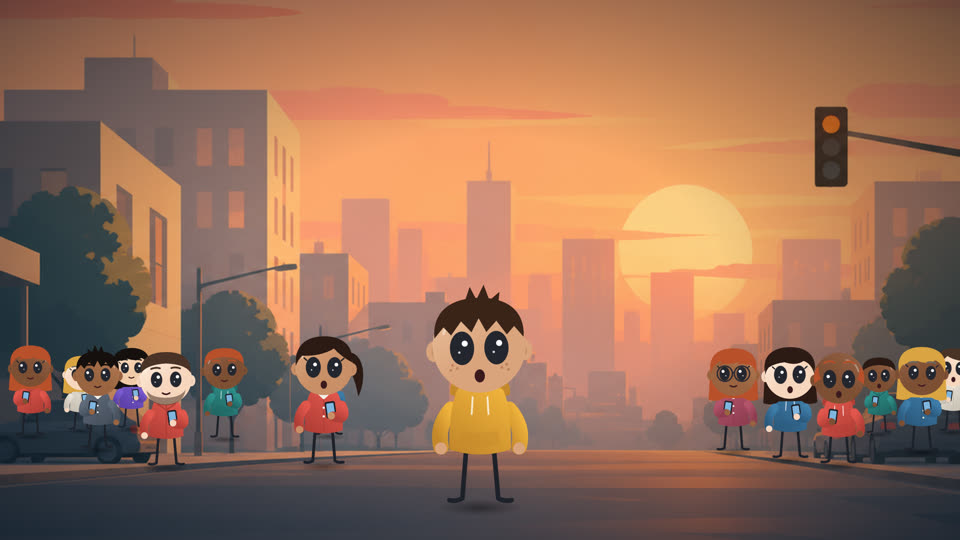
Each shot in the script says what you hear, where it happens, who is in it and how they react. This is a real shot from the example video and what comes out of it.

The shot in the script

“But everyone is staring at the same black screen.”

VoiceNarrator
SettingStreet at sunset
Main characterRory, surprised, in the centre
Crowd14 people looking at their phones
Rory, surprised, in the street, surrounded by people looking at their phones

Real images and voices generated with the system, changing only the highlighted detail. The voices read the line of the shot.

Try it

Move the character yourself.

Change how it moves, its face, its colours and the setting. The backgrounds are images generated with the system.

Illustrative demo in the browser: the same drawing as the project’s character, simplified for the web. Videos are rendered with the project’s engine.

Movement
Expression
Colours
Hoodie
Skin
Hair
Setting

Real examples

What comes out of the system, untouched.

Short stories with different main characters, palettes and topics, with illustrations and charts that follow the voice.

“What if your phone died forever?”

A complete mini story: a narrator, three characters with their own voices, crowds, music and sound effects.

Length
30 seconds
Main character
Rory
Voice cost
under $0.01

“What if the Moon disappeared?”

Science with animated charts: weaker tides, extreme seasons and a sky full of stars.

Length
27 seconds
Main character
Rory
Voice cost
under $0.01

“What if you woke up 100 years in the future?”

Light-hearted sci-fi: flying cars, smart glasses and a shop that only accepts thoughts.

Length
30 seconds
Main character
Maya
Voice cost
under $0.01

“What if money disappeared overnight?”

Society and tension: savings at zero, closed banks and a market that goes back to bartering.

Length
29 seconds
Main character
Nora
Voice cost
under $0.01

The course

From zero to your first published video.

Short lessons, each with a single goal and a checklist at the end. Every lesson comes as a video and in writing.

By the end you will have

  • Your channel set up, with its topic, its style and its main character.
  • The voices chosen for the narrator and the characters.
  • Your first finished video, ready to upload to YouTube.

The course is in English and Spanish.

Getting started

  1. 0Welcome: your animated video factory
  2. 1The pieces and what they cost

Setting up

  1. 2Download and prepare your computer
  2. 3The voice key

Your channel

  1. 4Create your channel
  2. 5Your characters
  3. 6The voices
  4. 7The style of the backgrounds

Produce and publish

  1. 8From idea to script
  2. 9Produce the video
  3. 10Ask for changes
  4. 11Publish
  5. 12If something goes wrong

What you get

A channel with its own identity, video after video.

A character that is always the same

Your main character is drawn piece by piece, so its face, clothes and proportions never change between videos. Expressions and poses ready for every scene.

Your own visual identity

You define the style recipe for your backgrounds, the palette of each video, the character’s colours and the subtitle typography.

Settings and assets you reuse

Each background remembers where characters can stand. Supporting characters and settings are saved in your catalogue for the next videos.

Voices and animation your way

You pick a narrator and a fixed cast of voices. Characters talk, walk, run and react; there are crowds too.

Illustrations that follow the voice

If the story talks about the Moon, the Moon appears; if it talks about money, a counter drops to zero. Animated objects, charts and labels in your channel’s style.

Scenes with a full finish

Word-by-word subtitles, music that ducks under the voice by itself, sound effects and export at the loudness YouTube uses.

Technical details
  • Video edited in code with Remotion (React) and TypeScript; rendered at 2560 × 1440, 30 fps, H.264.
  • Voices through an API (built-in provider: GenAIPro), levelled to −19 LUFS, with every word aligned using Whisper.cpp. English and Spanish.
  • Backgrounds generated with Codex’s image tool, in parallel, cropped and scaled to 2K.
  • SVG characters: 10 expressions, 8 poses, blinking, breathing, lip sync, walking and running.
  • 32 animated illustrations and charts; automatic music and effects mix; final master at −14 LUFS with peaks ≤ −1 dBTP.
  • Several independent channels in one project; automated tests for the engine.

Is it for you?

Better to know before you buy.

It is for you if…

  • You want a YouTube channel with animated videos and your own character.
  • You would rather direct (the idea, the script, the review) than draw or code.
  • You have a Windows, Mac or Linux computer and can pay for ChatGPT and the voices.
  • You are happy to review each video before publishing it.

It is not for you if…

  • You want a button that publishes videos on its own, without reviewing them.
  • You expect guaranteed views or income.
  • You do not want to pay for ChatGPT or the voices (about $30 a month in total; if you already have ChatGPT Plus, just the voices).
  • You want videos with real people or filmed with a camera.

Requirements

What you need.

  • A Windows, Mac or Linux computerAbout 10 GB free and, ideally, 16 GB of memory.
  • A paid ChatGPT planTo use Codex, which runs the project with you.
  • A GenAIPro accountFor the voices, with paid credits.
  • No codingYou write no code and no commands: you talk to Codex.
Compatibility in detail
  • It works on Windows 10 and 11, macOS and Linux (Ubuntu or Debian). Windows 11 is where we have tested it the most.
  • It uses the Codex app (on Windows, called “ChatGPT” in the Microsoft Store); on Linux, Codex also works from the terminal.
  • GenAIPro is the only built-in voice provider for now, with English and Spanish (Spain) voices.
  • The first time you need a connection: Codex installs what is needed and downloads the sound library.
  • We have not yet measured how long it takes someone starting from scratch.

Price

One course, one payment.

Course + project

$72 one-time payment

  • 13 video and written lessons, from zero to your first published video
  • The complete project to download: video engine, character, supporting cast, sample backgrounds, music and effects
  • The instructions so Codex can run it with you
  • Access to the student area with your email

Before you pay

Which email should we send the course to?

Your email is the key to the course: there are no passwords.

You pay securely

On the Stripe page, by card, Apple Pay or other methods.

You get access instantly

You receive an email with a link: open it and you are in the course.

Come back any time

At animaschool.com/entrar, type this same email and we will send you a new link.

Secure payment with Stripe

Secure payment with Stripe. You get access in your inbox straight away.

14-day guarantee: if it turns out not to be for you, write to us before downloading the project and we will refund you in full.

Stuck? Write to [email protected] and we will reply within 24 business hours.

What you pay separately

The course: one-time payment

The price on the left only covers the course with the project.

A paid ChatGPT plan

Codex is included. With ChatGPT Plus, about $20 a month. Images use your plan’s quota, which refills by itself.

Voices, with credits

GenAIPro sells packs from $8 that expire after 30 days. The smallest one covers about 30 eight-minute videos a month. In total, about $30 a month; if you already pay for ChatGPT Plus, the voices are the only new cost.

Prices as of October 2026. Check them on the official websites before you subscribe.

Who is behind it

The creator of the system

Juan Delgado

Juan Delgado

I built this system to produce my own animated videos without drawing, voicing or editing by hand.

Once I saw it worked, I turned it into a course so you can build your channel the same way.

For your channel

A format made for YouTube.

Animated “What if…?” videos with a recurring character are a common format on YouTube. With this system you can produce that kind of video with your own identity and publish regularly to grow your channel.

Views, growth and monetisation depend on your content and on YouTube’s terms: the course does not guarantee any of those results.

FAQ

What to know before you buy

How do I access the course?

When you pay, you get an email with a link to the student area. All the lessons and the project download are there. No password needed: you always sign in with your email.

Is this a website that makes videos?

No. The project is downloaded and runs on your own computer, with your own AI accounts. This website only hosts the course.

Do I need to know how to code?

No. No coding and no terminal. You tell Codex what you want in your own words, for example “I want to create a channel”, and it does the work.

Will I be able to make a good video myself?

The system gives you the character, the style, the voices and the editing already solved, and the course shows you the process from start to finish. The final quality also depends on your ideas and on how you review each scene.

Is it fully automatic?

Not entirely. AI does most of the work, but every video needs your review: fixing the script, choosing shots, asking for changes to a background or an effect.

Which languages can my videos be in?

English and Spanish (Spain), each with its own fixed cast of voices. The course is in both languages too.

Can I use the videos on my channel?

Yes, the videos you create are yours. The included music requires crediting the author in the description, and the system writes that text for you. The sound effects are free to use without attribution.

How much does it cost to produce a video?

Besides ChatGPT, you pay for voices with credits. An eight-minute video uses about 8,000 credits: GenAIPro’s smallest pack, at $8, covers about 30. Before spending anything, you can ask Codex how much it will cost.

Is it an official OpenAI product?

No. AnimaSchool is an independent project that works with their tools.

What if I get stuck or it is not for me?

If you get stuck, write to [email protected] and we will reply within 24 business hours. And if within 14 days of buying you find it is not for you, ask for a refund before downloading the project and we will refund you in full.

Your character, your style, your channel.